How to set up a Minecraft server
Make a Minecraft Java server two ways. Run Mojang's free server on your own PC, or rent one that stays online, then pick software, start it, and join.
TL;DR: There are two ways to make a Minecraft server. Run Mojang's free Java server on your own PC, or rent a server that stays online when your PC is off. Self-hosting costs nothing but needs Java 25, port forwarding, and a PC that stays on. berrybyte servers start at $9.95 a month and skip those steps.
Self-host or rent?
Pick the path that fits your group. Both run the same Java Edition game.
| Your own PC | Rented server | |
|---|---|---|
| Cost | Free, plus your power bill | From $9.95 a month on berrybyte |
| World online when you log off | Only if the PC stays on | Yes |
| Port forwarding | You set it up on your router | Not needed |
| Mods and plugins | Yes, after you swap in Paper, Fabric, or Forge by hand | Yes, plus one-click modpacks |
| Backups | You make your own copies | Automatic backups on every plan |
Self-hosting is a fine choice for a few friends who play together at set times. Rent a server when people want to play while you're away, or when your router won't let you forward ports.
Run the free server on your own PC
These steps start a Minecraft server with Mojang's official Java Edition software. The Minecraft Wiki tutorial covers each one in more depth.
Install Java 25
Minecraft Java 26.1 and later need Java 25. Install it, then open a
terminal and run java -version to check that it works.
Download server.jar
Get the server file from
Minecraft's server page.
If it saves as something like minecraft_server.26.3.jar, rename it to
server.jar. Put it in an empty folder, since it creates its files next
to itself.
Run it once
In that folder, run java -Xmx2G -jar server.jar --nogui. The -Xmx2G
part gives the server 2 GB of memory. It stops after creating
eula.txt.
Accept the EULA
Read the Minecraft EULA. Open
eula.txt, change eula=false to eula=true, and save it.
Start it again
Run the same command. Wait for the line
Done (…)! For help, type "help". Then
join from your own PC at localhost.
Open port 25565
Allow Java through your firewall. On your router, forward TCP port
25565 to your PC. Test it with a port checker while the server runs.
Friends outside your home then join with your public IP address.
The world is offline whenever your PC is off or asleep. If that's a problem, a hosted Minecraft server keeps it running.
Planning to charge players? Mojang's usage guidelines allow it, with rules on who can join and what you can sell.
How much RAM does a Minecraft server need?
The Minecraft Wiki suggests at least 2 GB for a small Java server. On berrybyte, 4 GB suits a small vanilla group and 8 GB suits plugins or light modding. ATM10 and Better MC start at 8 GB.
The RAM calculator gives a number for your player count and mods.
Set up on berrybyte
The rest of this guide covers a berrybyte server. It appears in the dashboard after checkout and installation.
Open it, confirm the software, then follow Console until the server is ready. The account and payment flow lives in Create your first server.
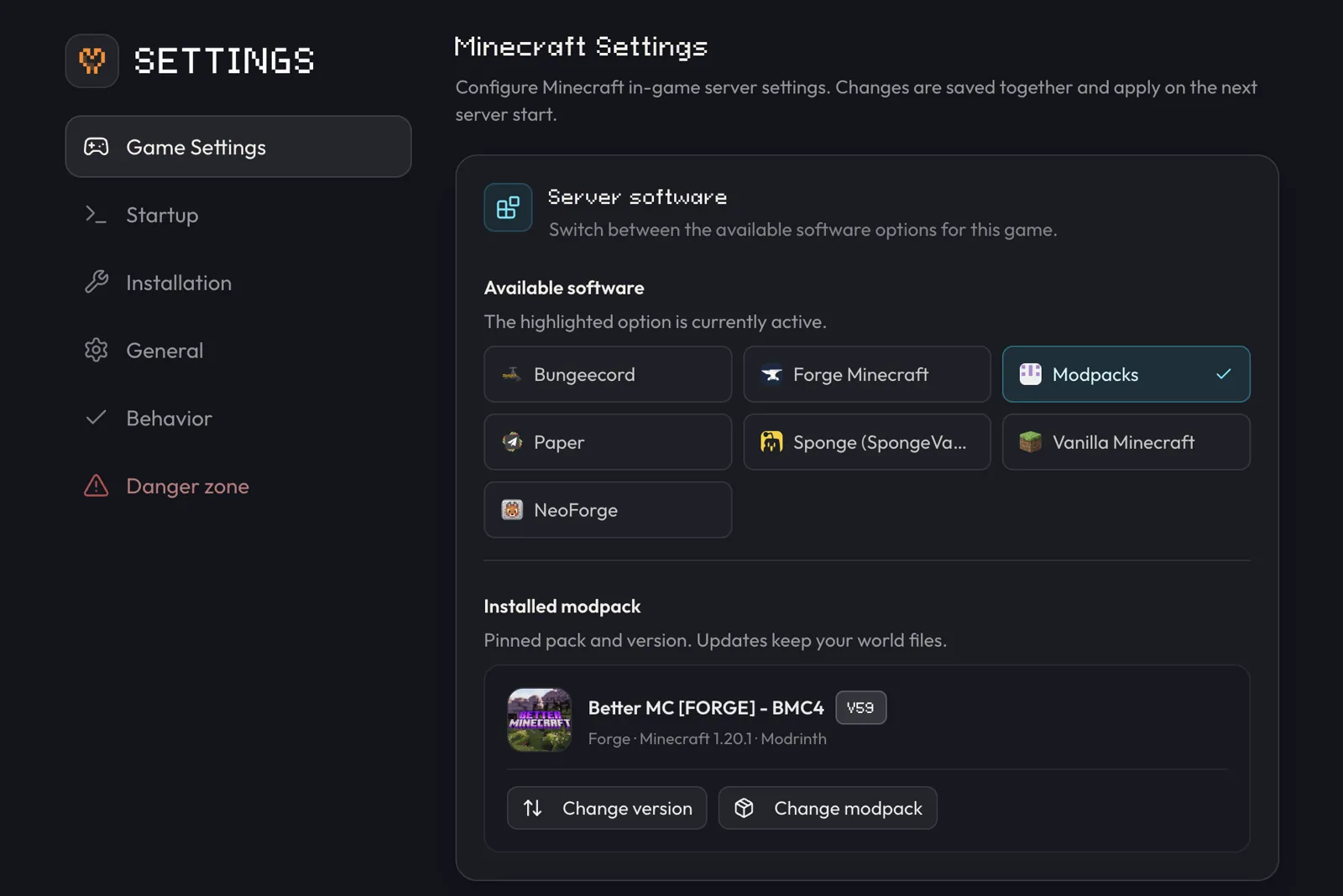
Pick the server software
The software choice decides which plugins or mods can load. It also fixes the Minecraft version that every player needs.
| Software | Best fit | What players install |
|---|---|---|
| Vanilla | Mojang gameplay with the official server | The matching Java release |
| Paper | Survival servers, plugins, and performance controls | The matching Java release |
| Fabric | Lightweight or Fabric-specific mods | Fabric Loader and the same client mods |
| Forge | Forge mod collections | Forge and the same client mods |
| NeoForge | Current NeoForge mod collections | NeoForge and the same client mods |
| Modpacks | A published pack from Modrinth, CurseForge, or FTB | The identical pack and pack version |
Paper accepts Bukkit, Spigot, and Paper plugins. Fabric, Forge, and NeoForge
load mods built for their own loader. A plugin jar belongs in plugins/; a
loader mod belongs in mods/. Paper's
getting started guide covers
its Java and startup requirements.
To add mods one by one, follow How to add mods to a Minecraft server.
Choose Paper for a typical private or community Java server that needs plugins. Choose the loader named by the mod author when the server needs mods. Use the Modpacks picker for a complete published pack.
On berrybyte, open Overview → Configuration → Software → Change. The same picker is available under Settings → Game Settings → Server software. Choose the loader, Minecraft version, and build offered for it. A published pack uses Overview → Modpack → Change; the full process is in Install a Minecraft modpack.
Choose a stable version
Minecraft Java 26.3 Wilderness Bound is the current release as of October 2026, and berrybyte supports it. Use the newest stable release that your loader, plugins, and mods support.
Older versions stay available for packs that need them. The Minecraft Wiki's version history lists each release. When a new release comes out, follow How to update a Minecraft server.
Loading a world on a newer Minecraft release upgrades its data. A later downgrade is unsupported and can damage that world. Create a backup before changing the version, loader, or modpack.
Complete the first boot
Open the server
Select the new server in the berrybyte dashboard. Setup may still show as installing while the selected jar, loader, or pack downloads.
Start it
Press Start on Overview or in the server sidebar. Keep Console
open. The first boot creates server.properties, world data, and loader
config files.
Handle the EULA
The berrybyte installer records acceptance for a normal install. If
startup stops with the EULA message, read the
Minecraft EULA, then use the dashboard's
Accept Minecraft EULA dialog. It writes eula=true to eula.txt and
starts the server.
Wait for readiness
Look for a line ending with Done and For help, type "help", or the
ready message supplied by the loader. World generation and large packs
can keep Console busy for several minutes.
Set the basics
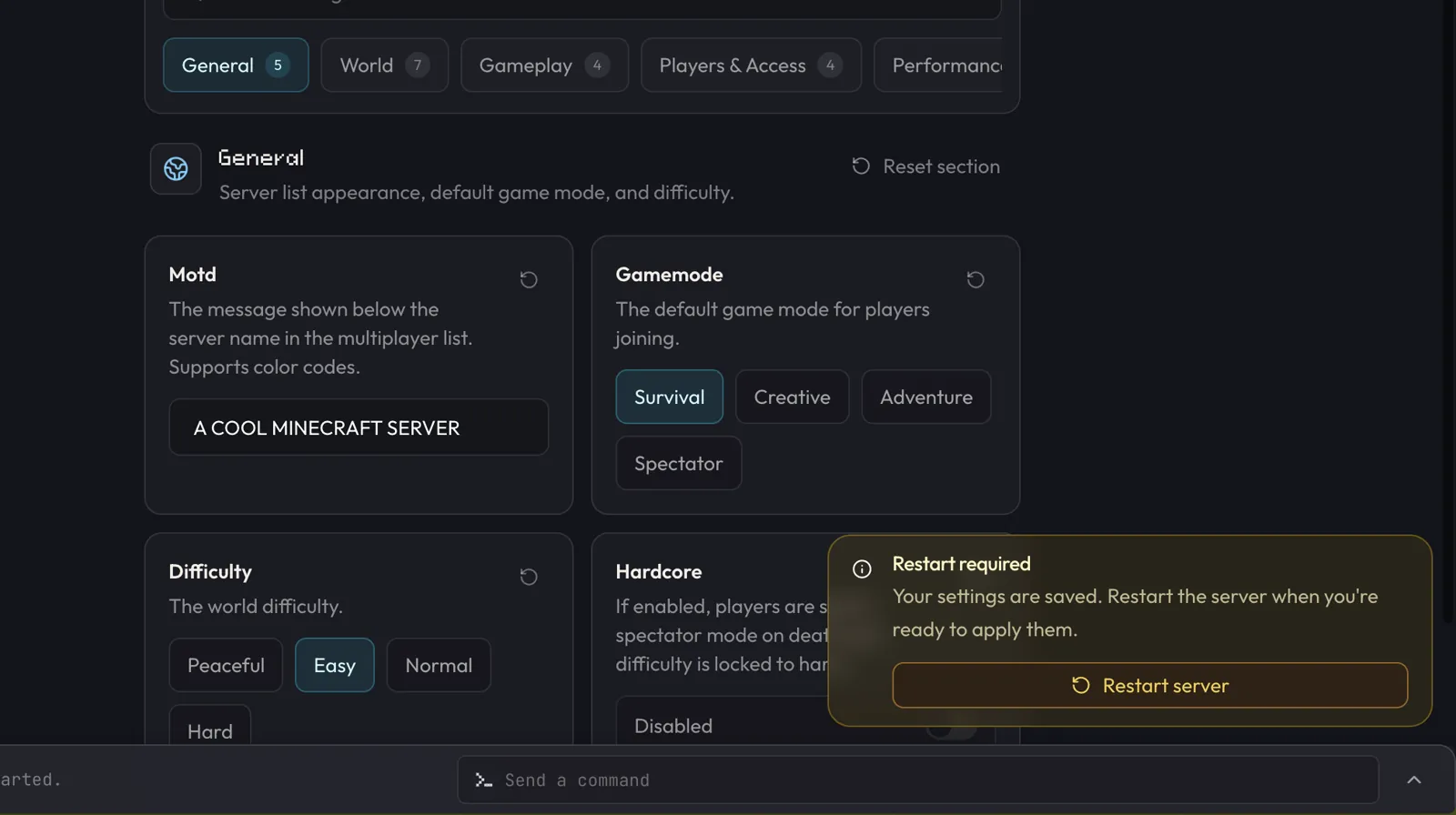
Open Settings → Game Settings. The Minecraft profile groups common
server.properties values by purpose. These are useful before players arrive:
- MOTD sets the text shown in the multiplayer list.
- Difficulty and Game mode shape the new player experience.
- Whitelist controls private access. Check the value shown for this server before you share the address.
- View distance and Simulation distance affect CPU, memory, and the amount of terrain sent to players.
- Level seed affects a world only when that world is first generated.
Save the page. A running server shows Restart required because
server.properties is read during startup. An offline server picks up the
changes on its next start.
The canonical
server.properties reference
describes the complete file. Advanced values remain available under
Files → server.properties. The
server.properties generator builds a file for you.
The allocated address and port come from berrybyte. Keep server-ip and
server-port under host control. Changing those fields by hand can make the
process listen on the wrong allocation.
If you plan a large public map, choose the world settings before generation. After the first successful join, Chunky can generate a planned area during a quiet window. The Aikar's flags guide explains the full memory allocation shown by many Paper and Fabric servers.
Join for the first time
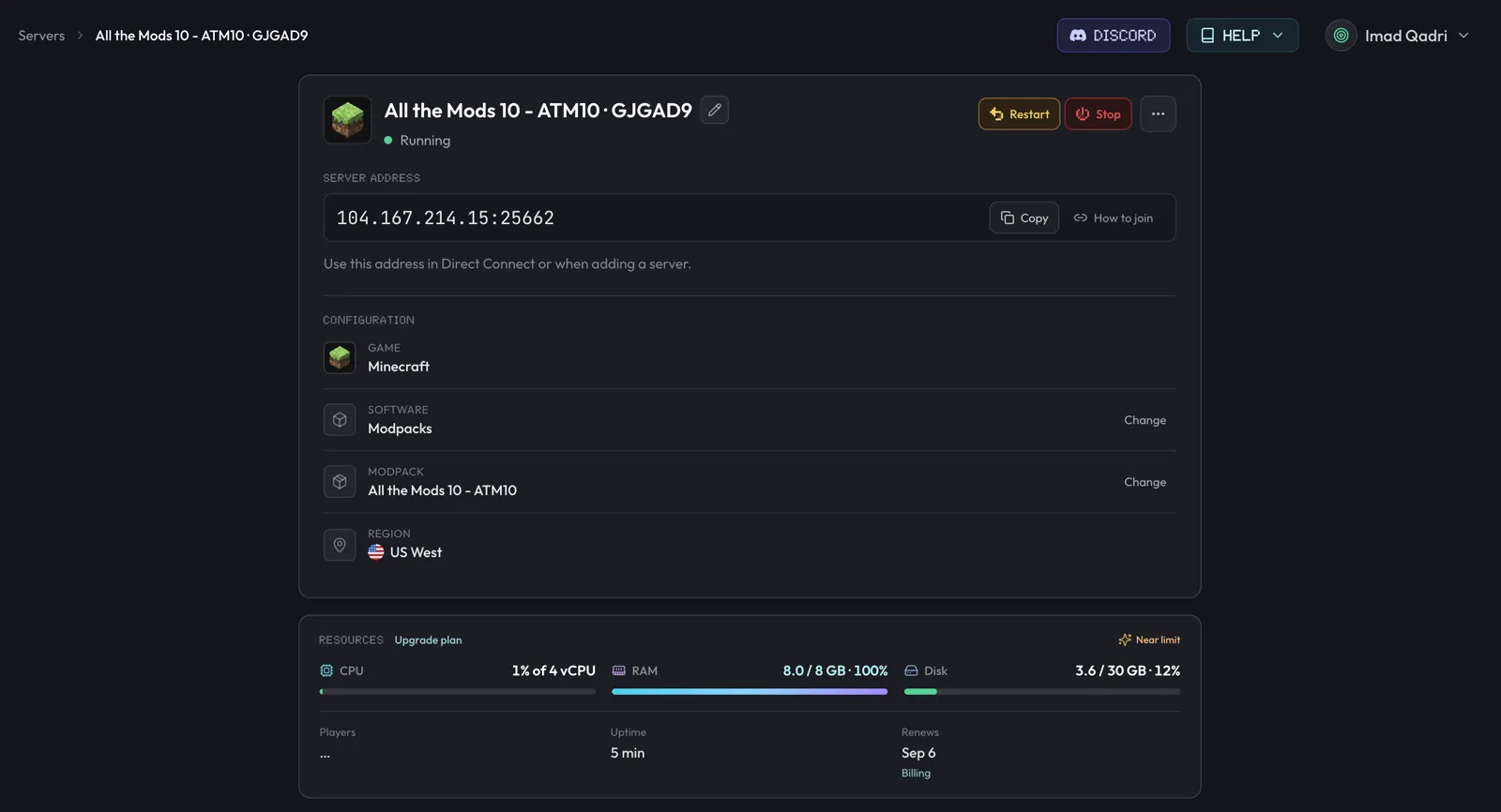
Copy the full address
Open Overview → Server address and press Copy. Keep the port shown
after the colon, since hosted allocations do not always use 25565.
Launch the matching client
Open the same Java release as the server. A modded server also needs the same loader, mods, or complete pack on the player's launcher.
Add the server
In Java Edition, choose Multiplayer → Add Server or Direct Connection. Paste the full address into its single address field.
Verify the world
Join, move away from spawn, and watch Console for your username. Confirm that chat, movement, and expected plugins or mods work before inviting the group.
See How to join a Minecraft server for custom domains and client steps. Use the ordered connection checklist when the first attempt fails.
Java and Bedrock crossplay
This setup creates a Java Edition server. Bedrock clients speak a different network protocol.
On Paper and similar plugin servers, download Geyser from
geysermc.org and stop the server. Upload the
jar through Overview → Plugins → Manage plugins, which opens Files at
plugins/.
Floodgate can authenticate Bedrock accounts when your community needs that path. Keep the Java listener and Geyser's Bedrock listener distinct, then give each player the address for their edition.
Geyser translates gameplay between editions, while the world remains a Java world. Moving a save between formats is a separate operation covered in Convert a Minecraft world.
Change software later
Create a full backup and stop the server. Open Server software, choose the new target, and read the reset warning in the picker. Let installation finish before editing files or pressing Start. Watch Console closely on the first boot.
Vanilla to Paper is a supported migration path documented by PaperMC. Modded blocks and items need their original mods, so a Forge or Fabric world can lose data when opened by software that lacks them. Plugin configurations also need matching plugin builds. Restore the backup if the startup log reports incompatible world data or missing registries.
Install a modpack instead
Want a full modpack? berrybyte installs packs from Modrinth, CurseForge, and FTB in one click, with the right loader and version. Browse them on Minecraft modpacks, and follow Install a Minecraft modpack for the steps.
Frequently asked questions
How do I make a Minecraft server?
Run Mojang's free Java Edition server on your own PC, or rent a hosted server. To self-host, install Java 25, download server.jar from minecraft.net, run it once, set eula=true in eula.txt, run it again, and forward TCP port 25565. A rented server skips those steps and stays online when your PC is off.
Is it easy to make a Minecraft server?
Yes, if you can use a command line. A small Java server on your own PC takes six steps. The hard parts are port forwarding and keeping the PC on. A hosted server handles both, so you only pick the software and share the address.
How much RAM does a Minecraft server need?
The Minecraft Wiki suggests at least 2 GB for a small Java server. On berrybyte, 4 GB suits a small vanilla group and 8 GB suits plugins or light mods. Big modpacks like ATM10 and Better MC start at 8 GB.
How do I create a Minecraft server with Java?
Install Java 25, which Minecraft Java 26.1 and later need. Put server.jar in its own folder and run java -Xmx2G -jar server.jar --nogui. Accept the EULA in eula.txt, then run the same command again. This is for Java Edition only. Bedrock uses a different server.
Is hosting a Minecraft server legal?
Yes. Mojang's usage guidelines say you may host a Minecraft server and may even charge for access. Only players with a paid copy of Minecraft can be let in, and paid perks can't give a competitive edge. Read the guidelines before you sell anything. The same rules cover Java and Bedrock servers.
Which Minecraft server software should I choose?
Vanilla gives the standard Mojang server. Paper supports plugins and adds performance controls. Fabric, Forge, and NeoForge run mods, while the Modpacks option installs a complete pack with its required loader and version. All of these are Java Edition servers. Bedrock players can join Paper through Geyser, but most modpacks don't support Bedrock.
What Minecraft version should a new server use?
Use the latest stable Minecraft Java Edition release that your software, plugins, and mods support. Minecraft Java Edition 26.3 Wilderness Bound is the current release as of October 2026, and berrybyte supports it. It needs Java 25. Back up before moving an existing world to a newer version.
How do I accept the Minecraft EULA on berrybyte?
For Java Edition servers, the berrybyte installer records EULA acceptance during setup. If eula.txt is removed and startup reaches the EULA check, the dashboard opens an Accept Minecraft EULA dialog and starts the server after you accept.
When is my Minecraft server ready to join?
Watch Console for the Java server's Done line or the loader's equivalent ready message. A process can be running while the world or a large modpack is still loading.
Can Bedrock players join this server?
berrybyte hosts Minecraft Java Edition. Install Geyser on Paper or another supported plugin server to translate Bedrock connections, then configure the Bedrock listener and share its port. Most Java modpacks don't support Bedrock players.